> ## Documentation Index
> Fetch the complete documentation index at: https://felimet-hub.jmcores.com/llms.txt
> Use this file to discover all available pages before exploring further.
# Technical Writing Guide & Document Quality Standards
> Technical writing guide covering Traditional Chinese typography, academic style, spacing, punctuation, proper nouns, Word formatting, and AI-assisted review.
## Overview
This guide consolidates practical experience in Chinese typesetting, academic writing, and engineering documentation. It applies to theses, technical reports, team documents, and similar contexts. Topics covered:
* **Typesetting basics**: Spacing in mixed Chinese-English text, correct use of full-width vs. half-width punctuation
* **Terminology conventions**: Proper noun capitalization, preferred terminology in Taiwanese academia
* **AI-assisted writing**: Recognizing common AI text patterns and quality-control strategies
* **Word editing**: Track Changes, character-spacing settings, cross-references for figures and tables
* **Figures and equations**: Image format requirements, flowchart color schemes, LaTeX math symbols
* **Automation tools**: Format-checking toolchains such as Pangu.js and AutoCorrect
**Core principle**
Official documents published by companies such as [Apple Taiwan](https://www.apple.com/tw/) and [Microsoft Taiwan](https://www.microsoft.com/zh-tw/) consistently follow these mixed Chinese-English spacing conventions. This is not a personal preference; it is an industry-recognized professional standard.
***
## Spacing Rules
**Note for Word users**
When editing in Microsoft Word, you can use the "Automatically adjust spacing between Chinese and Western text" feature (see [Word Document Editing Standards](#word-document-editing-standards)) and omit manual spaces. However, if the document will be converted to Markdown, plain text, or web format, it is recommended to follow the manual-spacing rules instead.
### Spacing in Mixed Chinese-English Text
Correct:
在 LeanCloud 上,資料儲存是圍繞 `AVObject` 進行的。
Incorrect:
在LeanCloud上,資料儲存是圍繞`AVObject`進行的。
Correct:
今天實驗測得溫度為 25°C,濕度達到 85%。
Incorrect:
今天實驗測得溫度為25°C,濕度達到85%。
Correct:
我們的伺服器配備 128 GB RAM 和 2 TB NVMe SSD。
Incorrect:
我們的伺服器配備 128GB RAM 和 2TB NVMe SSD。
Exception: degree (°) and percent (%) signs do not require a space.
### Spacing Rules for Full-Width Punctuation
**Common mistake**
Full-width punctuation marks (such as the Chinese comma「,」, period「。」, question mark「?」, etc.) should **not** have spaces added before or after them.
Correct:
剛剛配置完 CUDA,終於可以跑深度學習(Deep Learning,DL)模型了!
Incorrect:
剛剛配置完 CUDA ,終於可以跑深度學習(Deep Learning, DL)模型了 !
***
## Punctuation Rules
### Choosing Between Full-Width and Half-Width Punctuation
**Use full-width punctuation**
Correct:
核磁共振成像(NMRI)的原理是什麼?JFGI!
Incorrect:
核磁共振成像(NMRI)的原理是什麼?JFGI!
**Use half-width punctuation**
Correct:
賈伯斯那句話是怎麼說的?「Stay hungry, stay foolish.」
Incorrect:
賈伯斯那句話是怎麼說的?「Stay hungry,stay foolish。」
### Repeating Punctuation Marks
**Strictly prohibited**
Repeating exclamation marks or question marks severely undermines the professionalism and visual quality of a document.
Correct:
實驗結果竟然與理論預測完全一致!
Incorrect:
實驗結果竟然與理論預測完全一致!!!
實驗結果竟然與理論預測完全一致?!?!
### Differences Between Chinese and English Quotation Marks
Chinese and English use different quotation mark systems; mixing them disrupts typographic consistency.
| Type | Chinese quotes | English quotes | Usage |
| :----- | :------------- | :------------- | :------------------------------ |
| Single | 「」 | ' ' | General quotation, term marking |
| Double | 『』 | " " | Nested quotation within quotes |
**Nesting rules:**
* Chinese: outer layer uses「」, inner layer uses『』
* English: outer layer uses " ", inner layer uses ' '
Correct:
他說:「教授提到『這個方法不可行』,但我認為值得嘗試。」
Incorrect:
他說:"教授提到'這個方法不可行',但我認為值得嘗試。"
**Common confusion**
Traditional Chinese in Taiwan uses「」and『』, not the English "" and ''. Many AI tools output English-style quotation marks by default; pay particular attention to replacing them.
***
## Proper Nouns and Terminology
### Correct Capitalization
Proper nouns must follow the capitalization defined by their official sources; this is an important indicator of technical document professionalism.
| Correct | Incorrect |
| :-------------------------------- | :--------------------------------- |
| GitHub, GitLab, Google, Microsoft | github, Github, GITHUB |
| PyTorch, TensorFlow, OpenCV | pytorch, Pytorch, PYTORCH |
| JavaScript, TypeScript, Python | javascript, Javascript, JAVASCRIPT |
| macOS, iOS, Linux, Windows | macos, MacOS, MACOS |
| CUDA, cuDNN, NVIDIA | cuda, Cuda, nVidia |
**HTML/CSS special handling**
When a webpage must display text in all-uppercase or all-lowercase to match a visual style, the HTML source should use standard casing and control the display via the CSS `text-transform` property.
### Preferred Terminology in Taiwanese Academia (a representative selection; follow your organization's style guide in practice)
The following table describes the terminology conventions used in Taiwanese academic writing. These differ from the Mandarin terms commonly used in mainland China; the "incorrect" column reflects the mainland variants that should be avoided in a Taiwan academic context.
| Preferred (Taiwan) | Avoid | Notes |
| :----------------------- | :-------------------------- | :-------------------------------------------------------- |
| 資料 (data) | 數據 (organization-dependent) | Exception: "大數據" (Big Data) is an established proper noun |
| 軟體 (software) | 軟件 | Preferred in Taiwanese academia |
| 網路 (network) | 網絡 | Preferred in Taiwanese academia |
| 演算法 (algorithm) | 算法 | Preferred in Taiwanese academia |
| 畫格 (frame) | 幀、影格 | Preferred in Taiwanese image-processing fields |
| 研究計畫 (research plan) | 研究計劃 | 「計畫」 denotes a planning nature |
| 規劃 (planning) | 規畫 | Ministry of Education recommended form |
| 訊息 (information/message) | 信息 | Preferred in Taiwanese academia |
### Avoid Non-Standard Abbreviations
Correct:
我們需要一位熟悉 TypeScript、HTML5,至少理解一種框架(如 React、Next.js)的前端開發者。
Incorrect:
我們需要一位熟悉 Ts、h5,至少理解一種框架(如 RJS、nextjs)的 FED。
***
## Pitfalls of AI-Assisted Writing
### Common AI Text Patterns (a representative selection; follow your organization's style guide in practice)
**AI-generated text markers**
The following transition words and phrasings tend to reveal AI-generated text and should be avoided:
**Expressions to avoid:**
* "旨在探討" (aims to explore) → replace with "本研究探討" (this study examines) or a direct statement
* "創新性地" (innovatively) → replace with "首次" (for the first time) or "提出新方法" (proposes a new method)
* "值得注意的是" (it is worth noting that) → replace with "特別地" (specifically) or "重要的是" (importantly)
* "聚焦於" (focuses on) → replace with "專注於" (concentrates on) or "針對" (targeting)
* "深度剖析" (in-depth dissection) → replace with "分析" (analyzes) or "探討" (examines)
* "全方位" (comprehensive/all-around) → replace with "多方面" (multi-faceted) or enumerate specific aspects
**Rewriting example:**
本研究旨在探討深度學習模型在影像辨識領域的應用,
創新性地提出了一種多尺度特徵融合架構。值得注意的是,
該方法在多個基準資料集上均取得了顯著性能提升。
本研究探討深度學習模型在影像辨識的應用,提出多尺度
特徵融合架構。實驗結果顯示,該方法在 COCO、ImageNet
等基準資料集上的平均精確度提升 12.3%。
### Quality Control for AI-Assisted Writing
AI writing assistance tools are now quite mature; refinement, polishing, and rhetorical adjustments can all be completed quickly. However, AI-generated text frequently carries **lexical biases tied to specific language contexts**, particularly regarding differences between Traditional and Simplified Chinese and between Taiwanese and mainland Chinese terminology. Such output will almost certainly contain terms that do not conform to your organization's style guide.
**AI output ≠ deliverable document**
No matter how advanced an AI tool is, the name on the document is yours, and what you submit represents your professional standards. After every AI-assisted draft, review each paragraph carefully to verify that the descriptions, phrasing, and terminology conform to your organization's guidelines.
**Recommended approach:** Invest time in crafting dedicated prompt templates, skills, workflows, or agent rules for your AI tools to constrain output quality at the source. Even with such constraints, manual review remains indispensable: the rules reduce the error rate; they do not eliminate it.
**Best practice**
After using AI for rhetorical refinement and polishing, perform multiple rounds of manual review to ensure sentences read naturally, conform to academic standards, and are free of all AI marker vocabulary.
***
## Word Document Editing Standards
### Essential Settings
* Location: Word toolbar → "Review" → "Track Changes"
* Purpose: Preserve the full editing history for collaboration and version management
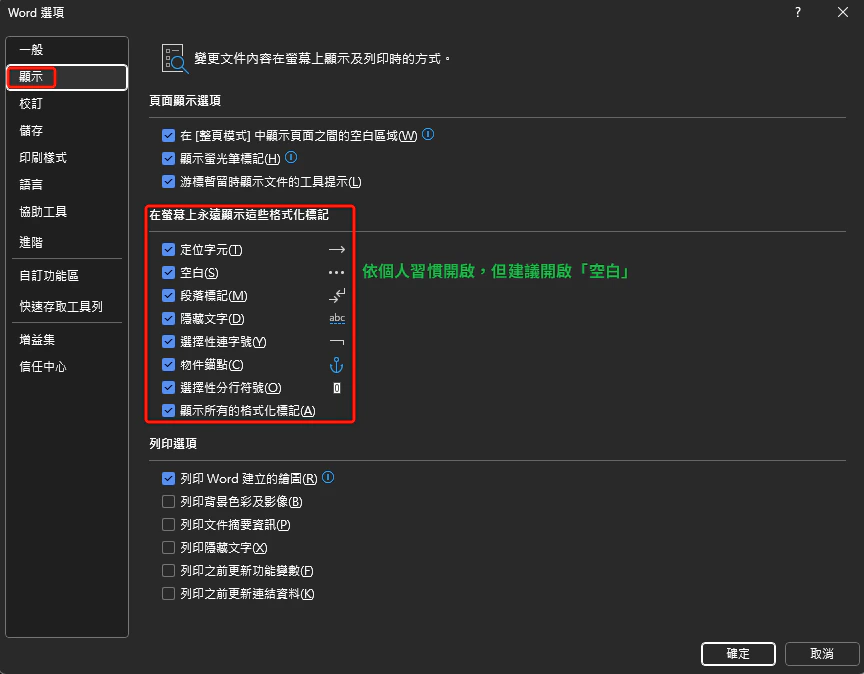
* Location: "File" → "Options" → "Display"
* Check: "Spaces", "Paragraph marks", "Hidden text"
* Purpose: Ensure consistent formatting and catch hidden formatting errors
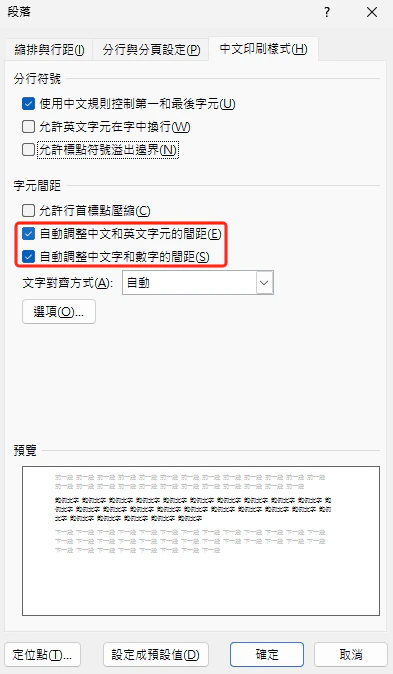
 * Location: Select the body text style → right-click → "Modify Style" → "Format" (lower left) → "Paragraph" → "Asian Typography" tab
* Check: "Automatically adjust spacing between Chinese and Western text" and "Automatically adjust spacing between Chinese text and numbers"
* Effect: Word automatically inserts fine-tuned spacing between Chinese and Latin/numeric characters, so manual spaces are not needed
* Location: Select the body text style → right-click → "Modify Style" → "Format" (lower left) → "Paragraph" → "Asian Typography" tab
* Check: "Automatically adjust spacing between Chinese and Western text" and "Automatically adjust spacing between Chinese text and numbers"
* Effect: Word automatically inserts fine-tuned spacing between Chinese and Latin/numeric characters, so manual spaces are not needed
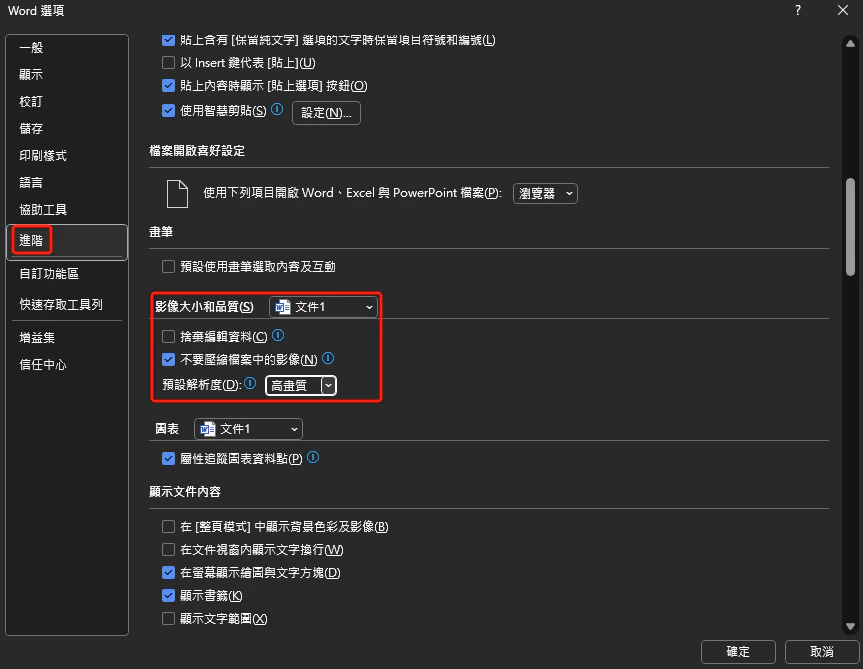
 * Location: "File" → "Options" → "Advanced"
* Uncheck: "Do not compress images in file"
* Purpose: Preserve the original image resolution
* Location: "File" → "Options" → "Advanced"
* Uncheck: "Do not compress images in file"
* Purpose: Preserve the original image resolution
 **Word automatic spacing vs. manual spaces**
**Characteristics of Word's automatic character spacing:**
* Visual result: spacing appears in Word and PDF output, clean typesetting
* Copy behavior: when PDF content is copied into a plain-text editor (Markdown, txt), **spaces are automatically inserted**
* Cross-platform limitation: this feature only works within the Microsoft Word ecosystem
**Characteristics of manual spaces:**
* Universality: consistent across all editors, web pages, and plain-text environments
* Version-control friendly: Git diffs clearly show spacing changes
* Aligns with this guide's recommendation: consistent with Markdown, code comments, and other technical documents
**Recommended strategy:**
* **Word-only documents** (circulated solely as Word/PDF) → use automatic adjustment
* **Multi-platform technical documents** (Markdown, web, code) → add spaces manually
* **Team collaboration**: follow your organization's internal style guide first to ensure consistency
### Color Conventions for Revision Marks
The following color conventions are for reference only; follow your organization's style guide in practice.
| Color | Revision type | Specific use |
| :----- | :--------------------- | :-------------------------------------------------- |
| Red | Deletion | Remove content and ensure logical flow |
| Cyan | Addition / query | New content, items to verify, or uncertain sections |
| Yellow | Revision / elaboration | Rewrite phrasing or restructure the argument |
### Figure and Table Layout and Cross-References
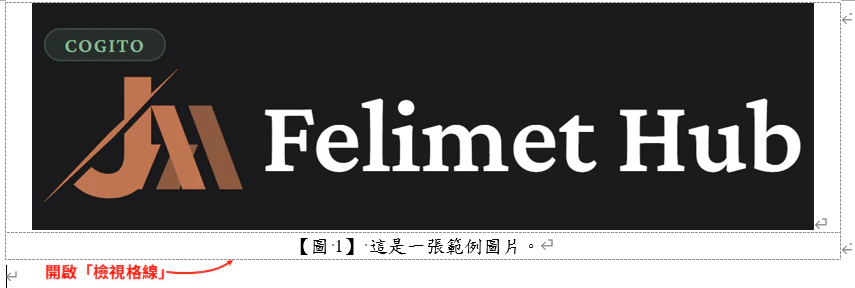
**Figure layout tip**
Use a **table** to position figures, set the table to "No borders" and enable "View Gridlines" to ensure precise alignment of figures and tables.
**Word automatic spacing vs. manual spaces**
**Characteristics of Word's automatic character spacing:**
* Visual result: spacing appears in Word and PDF output, clean typesetting
* Copy behavior: when PDF content is copied into a plain-text editor (Markdown, txt), **spaces are automatically inserted**
* Cross-platform limitation: this feature only works within the Microsoft Word ecosystem
**Characteristics of manual spaces:**
* Universality: consistent across all editors, web pages, and plain-text environments
* Version-control friendly: Git diffs clearly show spacing changes
* Aligns with this guide's recommendation: consistent with Markdown, code comments, and other technical documents
**Recommended strategy:**
* **Word-only documents** (circulated solely as Word/PDF) → use automatic adjustment
* **Multi-platform technical documents** (Markdown, web, code) → add spaces manually
* **Team collaboration**: follow your organization's internal style guide first to ensure consistency
### Color Conventions for Revision Marks
The following color conventions are for reference only; follow your organization's style guide in practice.
| Color | Revision type | Specific use |
| :----- | :--------------------- | :-------------------------------------------------- |
| Red | Deletion | Remove content and ensure logical flow |
| Cyan | Addition / query | New content, items to verify, or uncertain sections |
| Yellow | Revision / elaboration | Rewrite phrasing or restructure the argument |
### Figure and Table Layout and Cross-References
**Figure layout tip**
Use a **table** to position figures, set the table to "No borders" and enable "View Gridlines" to ensure precise alignment of figures and tables.
 **Correct approach for figure and table numbering:**
1. After inserting a figure or table, use "Insert Caption" to auto-number it (follow your organization's numbering format)
2. When citing in the body text, use "Cross-Reference" rather than manually typing the number
3. Benefit: when the order of figures or tables changes, numbering updates automatically
Example references:
* As shown in \[Figure 3], the model's recognition accuracy remains stable across different test conditions.
* \[Table 2] lists a comparison of computation times across algorithms.
***
## Figures and Flowchart Standards
### Image Format Requirements
**Recommended format: SVG**
* Use cases: flowcharts, architecture diagrams, schematics
* Advantages: infinite scaling without quality loss, small file size
* Tools: Visio, draw\.io, yEd
**Recommended format: high-resolution PNG**
* Use cases: screenshots, experimental result photos
* Minimum resolution: 800 × 800 pixels
* Note: figures cited from references must be clearly legible
### Visio Export Settings
**Visio PNG export pitfall**
Exporting PNG directly from Visio can produce unexpected graphic symbols or formatting errors. Confirm the following settings before exporting:
**Recommended export steps:**
Open the Visio file and choose "File" → "Save As".
Set the file type to "Portable Network Graphics (\*.png)".
Click the "Options" button and configure:
* Resolution: 800 DPI or higher
* Background: transparent (if needed)
* Size: maintain original proportions
After exporting, verify the graphic is complete and no symbols are missing.
**Alternative tool comparison:**
| Tool | Strengths | Best for |
| :----------------------------------------- | :---------------------------------------------- | :--------------------------------------- |
| [draw.io](https://www.drawio.com/) | Free, cross-platform, cloud storage | System architecture diagrams, flowcharts |
| [yEd](https://www.yworks.com/products/yed) | Auto-layout, hierarchical placement | Complex network topology diagrams |
| Visio | Microsoft ecosystem integration, rich templates | Enterprise-grade professional diagrams |
### Flowchart Color Principles
**Recommended color tools**
* [Coolors](https://coolors.co/): quickly generate harmonious color schemes
* [Adobe Color](https://color.adobe.com/): professional color pairing tool
***
## Mathematical Equations and References
### MathType Equation Editor
**Tool installation**
MathType is the most professional mathematical equation editor for Word, supporting LaTeX syntax and a symbol panel.
Visit the [MathType website](https://www.wiris.com/mathtype/) to download and install.
**Equation numbering conventions:**
Correct (half-width parentheses):
E = $mc^2$ (1)
Incorrect (full-width parentheses):
* E = $mc^2$ ...... (1)
* E = $mc^2$ (1)
**Common math symbol conventions:**
| Symbol type | LaTeX syntax | Example |
| :-------------------- | :----------------- | :----------------------- |
| Greek letters | `\alpha`, `\beta` | $\alpha, \beta, \gamma$ |
| Superscript/subscript | `x^2`, `x_i` | $x^2, x_i$ |
| Fraction | `\frac{a}{b}` | $\frac{a}{b}$ |
| Summation | `\sum_{'{i=1}'}^n` | $\sum_{'{i=1}'}^{'{n}'}$ |
| Integral | `\int_a^b` | $\int_a^b$ |
### EndNote Reference Management
**Core EndNote features**
* Automatically generate reference lists
* Support multiple citation styles (IEEE, APA, Chicago, etc.)
* Seamless integration with Word: citations are auto-numbered on insertion
**IEEE citation format examples:**
A. B. Smith and Y. K. Chen, "Deep learning for autonomous
driving: A survey," IEEE Trans. Pattern Anal. Mach. Intell.,
vol. 43, no. 8, pp. 2345-2367, Aug. 2021,
doi: 10.1109/TPAMI.2021.1234567.
A. B. Smith, "Real-time object detection using deep learning,"
in Proc. IEEE Conf. Comput. Vis. Pattern Recognit.,
Seattle, WA, USA, 2024, pp. 1234-1242.
C. D. Lee, Machine Learning Fundamentals, 3rd ed.,
Cambridge, MA, USA: MIT Press, 2023, pp. 456-489.
E. F. Wang. "Introduction to PyTorch." PyTorch Official.
[https://pytorch.org/tutorials/](https://pytorch.org/tutorials/) (accessed Jan. 15, 2024).
***
## Automation Checking Tools
More tools available [here](https://github.com/sparanoid/chinese-copywriting-guidelines?tab=readme-ov-file#%E5%B7%A5%E5%85%B7)
### Pangu.js Toolchain
[pangu.js](https://github.com/vinta/pangu.js) automatically inserts spaces between Chinese and English text, with support for multiple programming languages and editors.
JavaScript implementation, usable in both browsers and Node.js
Python version, suitable for batch-processing Markdown files
Vim plugin, formats the current file in real time
JetBrains IDE plugin, supports PyCharm and IntelliJ IDEA
### AutoCorrect Toolchain
[AutoCorrect](https://github.com/huacnlee/autocorrect) is more powerful than Pangu, with support for auto-correcting punctuation, proper noun capitalization, and more.
**Installation and usage:**
# Install (Rust version)
cargo install autocorrect
# Check a file
autocorrect --lint document.md
# Auto-fix
autocorrect --fix document.md
Search for "AutoCorrect" in the Extensions marketplace and install it; files will be auto-formatted on save.
# .github/workflows/lint.yml
* name: Lint documents
run: |
cargo install autocorrect
autocorrect --lint docs/\*\*/\*.md
***
## Pre-Publication Checklist
### Items to Check Before Publishing
* [ ] Space between Chinese and English text
* [ ] Space between Chinese text and numerals
* [ ] Space between numerals and units (except degrees and percentages)
* [ ] No extra spaces before or after full-width punctuation
* [ ] Full-width punctuation in Chinese contexts
* [ ] Half-width punctuation in English contexts
* [ ] No repeated exclamation marks or question marks
* [ ] Correct quotation marks (Chinese「」, English "")
* [ ] Correct capitalization for GitHub, Google, Microsoft, etc.
* [ ] Correct technical terms: PyTorch, TensorFlow, CUDA, etc.
* [ ] Taiwan academic terminology used (資料, 軟體, 演算法)
* [ ] No non-standard abbreviations (avoid h5, Ts, FED, etc.)
* [ ] Removed transition phrases such as "旨在探討", "創新性地", etc.
* [ ] Sentences read naturally with no machine-generated feel
* [ ] Arguments are specific; vague filler descriptions removed
* [ ] Image resolution meets requirements (vector or 800+ DPI)
* [ ] Figure and table numbers use cross-references
* [ ] Flowchart color scheme is harmonious and professional
* [ ] All figures and tables are cited in the body text
* [ ] Managed with EndNote
* [ ] Consistent citation format (IEEE/APA, etc.)
* [ ] DOIs or URLs are complete and accessible
* [ ] No missing or incorrect citation numbers
***
## Related Resources
* [Chinese Copywriting Guidelines GitHub Repo](https://github.com/sparanoid/chinese-copywriting-guidelines)
* [pangu.js toolchain](https://github.com/vinta/pangu.js)
* [AutoCorrect](https://github.com/huacnlee/autocorrect)
* [EndNote](https://endnote.com/)
* [MathType](https://www.wiris.com/mathtype/)
***
## Closing Remarks
The quality of a technical document directly affects professional image and the effectiveness of knowledge communication. Following this guide not only improves document readability but also establishes a unified writing standard for the team.
**Continuous improvement**
Review and update this guide regularly to incorporate new technical writing trends and community best practices. Questions and suggestions are always welcome; discuss them with team members at any time.
**Key takeaways:**
* **Spacing signals professionalism**: mixed Chinese-English text must include spaces
* **Punctuation must be correct**: full-width and half-width each have their place; never repeat
* **Proper nouns must be precise**: capitalization follows official definitions
* **Eliminate AI lexical errors**: remove filler transition phrases and ensure natural phrasing
* **Leverage automation tools**: Pangu.js and AutoCorrect improve efficiency
* **Rigorous figure standards**: prefer vector graphics; use cross-references for numbering
* **Complete references**: use EndNote and maintain a consistent citation format
Make every technical document a demonstration of professionalism and care.
**Correct approach for figure and table numbering:**
1. After inserting a figure or table, use "Insert Caption" to auto-number it (follow your organization's numbering format)
2. When citing in the body text, use "Cross-Reference" rather than manually typing the number
3. Benefit: when the order of figures or tables changes, numbering updates automatically
Example references:
* As shown in \[Figure 3], the model's recognition accuracy remains stable across different test conditions.
* \[Table 2] lists a comparison of computation times across algorithms.
***
## Figures and Flowchart Standards
### Image Format Requirements
**Recommended format: SVG**
* Use cases: flowcharts, architecture diagrams, schematics
* Advantages: infinite scaling without quality loss, small file size
* Tools: Visio, draw\.io, yEd
**Recommended format: high-resolution PNG**
* Use cases: screenshots, experimental result photos
* Minimum resolution: 800 × 800 pixels
* Note: figures cited from references must be clearly legible
### Visio Export Settings
**Visio PNG export pitfall**
Exporting PNG directly from Visio can produce unexpected graphic symbols or formatting errors. Confirm the following settings before exporting:
**Recommended export steps:**
Open the Visio file and choose "File" → "Save As".
Set the file type to "Portable Network Graphics (\*.png)".
Click the "Options" button and configure:
* Resolution: 800 DPI or higher
* Background: transparent (if needed)
* Size: maintain original proportions
After exporting, verify the graphic is complete and no symbols are missing.
**Alternative tool comparison:**
| Tool | Strengths | Best for |
| :----------------------------------------- | :---------------------------------------------- | :--------------------------------------- |
| [draw.io](https://www.drawio.com/) | Free, cross-platform, cloud storage | System architecture diagrams, flowcharts |
| [yEd](https://www.yworks.com/products/yed) | Auto-layout, hierarchical placement | Complex network topology diagrams |
| Visio | Microsoft ecosystem integration, rich templates | Enterprise-grade professional diagrams |
### Flowchart Color Principles
**Recommended color tools**
* [Coolors](https://coolors.co/): quickly generate harmonious color schemes
* [Adobe Color](https://color.adobe.com/): professional color pairing tool
***
## Mathematical Equations and References
### MathType Equation Editor
**Tool installation**
MathType is the most professional mathematical equation editor for Word, supporting LaTeX syntax and a symbol panel.
Visit the [MathType website](https://www.wiris.com/mathtype/) to download and install.
**Equation numbering conventions:**
Correct (half-width parentheses):
E = $mc^2$ (1)
Incorrect (full-width parentheses):
* E = $mc^2$ ...... (1)
* E = $mc^2$ (1)
**Common math symbol conventions:**
| Symbol type | LaTeX syntax | Example |
| :-------------------- | :----------------- | :----------------------- |
| Greek letters | `\alpha`, `\beta` | $\alpha, \beta, \gamma$ |
| Superscript/subscript | `x^2`, `x_i` | $x^2, x_i$ |
| Fraction | `\frac{a}{b}` | $\frac{a}{b}$ |
| Summation | `\sum_{'{i=1}'}^n` | $\sum_{'{i=1}'}^{'{n}'}$ |
| Integral | `\int_a^b` | $\int_a^b$ |
### EndNote Reference Management
**Core EndNote features**
* Automatically generate reference lists
* Support multiple citation styles (IEEE, APA, Chicago, etc.)
* Seamless integration with Word: citations are auto-numbered on insertion
**IEEE citation format examples:**
A. B. Smith and Y. K. Chen, "Deep learning for autonomous
driving: A survey," IEEE Trans. Pattern Anal. Mach. Intell.,
vol. 43, no. 8, pp. 2345-2367, Aug. 2021,
doi: 10.1109/TPAMI.2021.1234567.
A. B. Smith, "Real-time object detection using deep learning,"
in Proc. IEEE Conf. Comput. Vis. Pattern Recognit.,
Seattle, WA, USA, 2024, pp. 1234-1242.
C. D. Lee, Machine Learning Fundamentals, 3rd ed.,
Cambridge, MA, USA: MIT Press, 2023, pp. 456-489.
E. F. Wang. "Introduction to PyTorch." PyTorch Official.
[https://pytorch.org/tutorials/](https://pytorch.org/tutorials/) (accessed Jan. 15, 2024).
***
## Automation Checking Tools
More tools available [here](https://github.com/sparanoid/chinese-copywriting-guidelines?tab=readme-ov-file#%E5%B7%A5%E5%85%B7)
### Pangu.js Toolchain
[pangu.js](https://github.com/vinta/pangu.js) automatically inserts spaces between Chinese and English text, with support for multiple programming languages and editors.
JavaScript implementation, usable in both browsers and Node.js
Python version, suitable for batch-processing Markdown files
Vim plugin, formats the current file in real time
JetBrains IDE plugin, supports PyCharm and IntelliJ IDEA
### AutoCorrect Toolchain
[AutoCorrect](https://github.com/huacnlee/autocorrect) is more powerful than Pangu, with support for auto-correcting punctuation, proper noun capitalization, and more.
**Installation and usage:**
# Install (Rust version)
cargo install autocorrect
# Check a file
autocorrect --lint document.md
# Auto-fix
autocorrect --fix document.md
Search for "AutoCorrect" in the Extensions marketplace and install it; files will be auto-formatted on save.
# .github/workflows/lint.yml
* name: Lint documents
run: |
cargo install autocorrect
autocorrect --lint docs/\*\*/\*.md
***
## Pre-Publication Checklist
### Items to Check Before Publishing
* [ ] Space between Chinese and English text
* [ ] Space between Chinese text and numerals
* [ ] Space between numerals and units (except degrees and percentages)
* [ ] No extra spaces before or after full-width punctuation
* [ ] Full-width punctuation in Chinese contexts
* [ ] Half-width punctuation in English contexts
* [ ] No repeated exclamation marks or question marks
* [ ] Correct quotation marks (Chinese「」, English "")
* [ ] Correct capitalization for GitHub, Google, Microsoft, etc.
* [ ] Correct technical terms: PyTorch, TensorFlow, CUDA, etc.
* [ ] Taiwan academic terminology used (資料, 軟體, 演算法)
* [ ] No non-standard abbreviations (avoid h5, Ts, FED, etc.)
* [ ] Removed transition phrases such as "旨在探討", "創新性地", etc.
* [ ] Sentences read naturally with no machine-generated feel
* [ ] Arguments are specific; vague filler descriptions removed
* [ ] Image resolution meets requirements (vector or 800+ DPI)
* [ ] Figure and table numbers use cross-references
* [ ] Flowchart color scheme is harmonious and professional
* [ ] All figures and tables are cited in the body text
* [ ] Managed with EndNote
* [ ] Consistent citation format (IEEE/APA, etc.)
* [ ] DOIs or URLs are complete and accessible
* [ ] No missing or incorrect citation numbers
***
## Related Resources
* [Chinese Copywriting Guidelines GitHub Repo](https://github.com/sparanoid/chinese-copywriting-guidelines)
* [pangu.js toolchain](https://github.com/vinta/pangu.js)
* [AutoCorrect](https://github.com/huacnlee/autocorrect)
* [EndNote](https://endnote.com/)
* [MathType](https://www.wiris.com/mathtype/)
***
## Closing Remarks
The quality of a technical document directly affects professional image and the effectiveness of knowledge communication. Following this guide not only improves document readability but also establishes a unified writing standard for the team.
**Continuous improvement**
Review and update this guide regularly to incorporate new technical writing trends and community best practices. Questions and suggestions are always welcome; discuss them with team members at any time.
**Key takeaways:**
* **Spacing signals professionalism**: mixed Chinese-English text must include spaces
* **Punctuation must be correct**: full-width and half-width each have their place; never repeat
* **Proper nouns must be precise**: capitalization follows official definitions
* **Eliminate AI lexical errors**: remove filler transition phrases and ensure natural phrasing
* **Leverage automation tools**: Pangu.js and AutoCorrect improve efficiency
* **Rigorous figure standards**: prefer vector graphics; use cross-references for numbering
* **Complete references**: use EndNote and maintain a consistent citation format
Make every technical document a demonstration of professionalism and care.