

Overview
This guide consolidates practical experience in Chinese typesetting, academic writing, and engineering documentation. It applies to theses, technical reports, team documents, and similar contexts. Topics covered:- Typesetting basics: Spacing in mixed Chinese-English text, correct use of full-width vs. half-width punctuation
- Terminology conventions: Proper noun capitalization, preferred terminology in Taiwanese academia
- AI-assisted writing: Recognizing common AI text patterns and quality-control strategies
- Word editing: Track Changes, character-spacing settings, cross-references for figures and tables
- Figures and equations: Image format requirements, flowchart color schemes, LaTeX math symbols
- Automation tools: Format-checking toolchains such as Pangu.js and AutoCorrect
Spacing Rules
Note for Word usersWhen editing in Microsoft Word, you can use the “Automatically adjust spacing between Chinese and Western text” feature (see Word Document Editing Standards) and omit manual spaces. However, if the document will be converted to Markdown, plain text, or web format, it is recommended to follow the manual-spacing rules instead.
Spacing in Mixed Chinese-English Text
1
A space must be added between Chinese and English text
Correct:
在 LeanCloud 上,資料儲存是圍繞
AVObject 進行的。Incorrect:
在LeanCloud上,資料儲存是圍繞AVObject進行的。2
A space must be added between Chinese text and numerals
Correct:
今天實驗測得溫度為 25°C,濕度達到 85%。Incorrect:
今天實驗測得溫度為25°C,濕度達到85%。
3
A space must be added between a numeral and its unit
Correct:
我們的伺服器配備 128 GB RAM 和 2 TB NVMe SSD。Incorrect:
我們的伺服器配備 128GB RAM 和 2TB NVMe SSD。Exception: degree (°) and percent (%) signs do not require a space.
Spacing Rules for Full-Width Punctuation
Correct: 剛剛配置完 CUDA,終於可以跑深度學習(Deep Learning,DL)模型了! Incorrect: 剛剛配置完 CUDA ,終於可以跑深度學習(Deep Learning, DL)模型了 !Punctuation Rules
Choosing Between Full-Width and Half-Width Punctuation
- Chinese context
- English context
Use full-width punctuationCorrect:
核磁共振成像(NMRI)的原理是什麼?JFGI!Incorrect:
核磁共振成像(NMRI)的原理是什麼?JFGI!
Repeating Punctuation Marks
Strictly prohibitedRepeating exclamation marks or question marks severely undermines the professionalism and visual quality of a document.
Differences Between Chinese and English Quotation Marks
Chinese and English use different quotation mark systems; mixing them disrupts typographic consistency.
Nesting rules:
- Chinese: outer layer uses「」, inner layer uses『』
- English: outer layer uses ” ”, inner layer uses ’ ’
Common confusionTraditional Chinese in Taiwan uses「」and『』, not the English "" and ”. Many AI tools output English-style quotation marks by default; pay particular attention to replacing them.
Proper Nouns and Terminology
Correct Capitalization
Proper nouns must follow the capitalization defined by their official sources; this is an important indicator of technical document professionalism.HTML/CSS special handlingWhen a webpage must display text in all-uppercase or all-lowercase to match a visual style, the HTML source should use standard casing and control the display via the CSS
text-transform property.Preferred Terminology in Taiwanese Academia (a representative selection; follow your organization’s style guide in practice)
The following table describes the terminology conventions used in Taiwanese academic writing. These differ from the Mandarin terms commonly used in mainland China; the “incorrect” column reflects the mainland variants that should be avoided in a Taiwan academic context.Avoid Non-Standard Abbreviations
Correct: 我們需要一位熟悉 TypeScript、HTML5,至少理解一種框架(如 React、Next.js)的前端開發者。 Incorrect: 我們需要一位熟悉 Ts、h5,至少理解一種框架(如 RJS、nextjs)的 FED。Pitfalls of AI-Assisted Writing
Common AI Text Patterns (a representative selection; follow your organization’s style guide in practice)
Expressions to avoid:- “旨在探討” (aims to explore) → replace with “本研究探討” (this study examines) or a direct statement
- “創新性地” (innovatively) → replace with “首次” (for the first time) or “提出新方法” (proposes a new method)
- “值得注意的是” (it is worth noting that) → replace with “特別地” (specifically) or “重要的是” (importantly)
- “聚焦於” (focuses on) → replace with “專注於” (concentrates on) or “針對” (targeting)
- “深度剖析” (in-depth dissection) → replace with “分析” (analyzes) or “探討” (examines)
- “全方位” (comprehensive/all-around) → replace with “多方面” (multi-faceted) or enumerate specific aspects
- AI-generated version
- Human-revised version
本研究旨在探討深度學習模型在影像辨識領域的應用,
創新性地提出了一種多尺度特徵融合架構。值得注意的是,
該方法在多個基準資料集上均取得了顯著性能提升。
Quality Control for AI-Assisted Writing
AI writing assistance tools are now quite mature; refinement, polishing, and rhetorical adjustments can all be completed quickly. However, AI-generated text frequently carries lexical biases tied to specific language contexts, particularly regarding differences between Traditional and Simplified Chinese and between Taiwanese and mainland Chinese terminology. Such output will almost certainly contain terms that do not conform to your organization’s style guide. Recommended approach: Invest time in crafting dedicated prompt templates, skills, workflows, or agent rules for your AI tools to constrain output quality at the source. Even with such constraints, manual review remains indispensable: the rules reduce the error rate; they do not eliminate it.Word Document Editing Standards
Essential Settings
1
Enable Track Changes
- Location: Word toolbar → “Review” → “Track Changes”
- Purpose: Preserve the full editing history for collaboration and version management
2
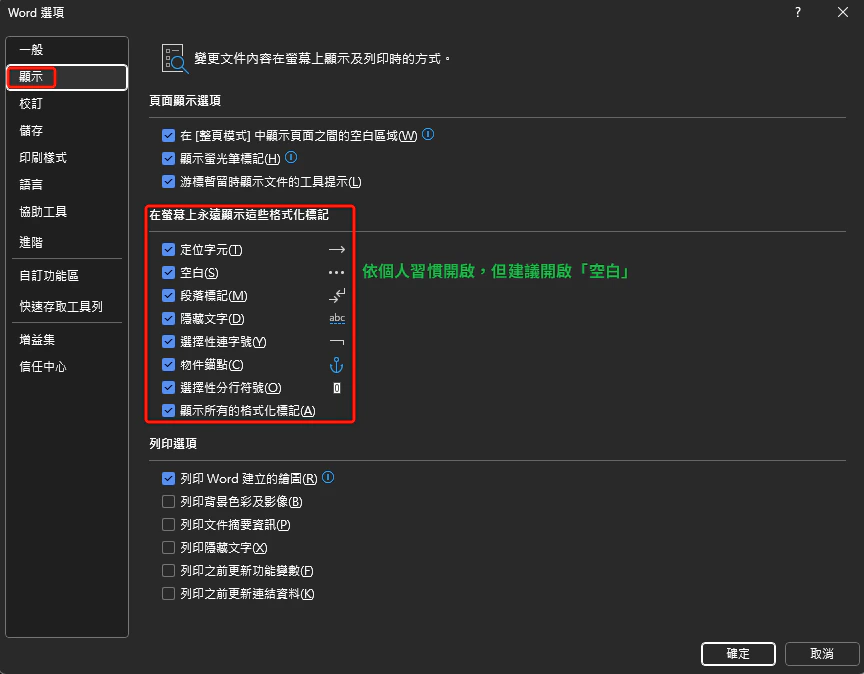
Show formatting marks
- Location: “File” → “Options” → “Display”
- Check: “Spaces”, “Paragraph marks”, “Hidden text”
-
Purpose: Ensure consistent formatting and catch hidden formatting errors
3
Set automatic character spacing (important)
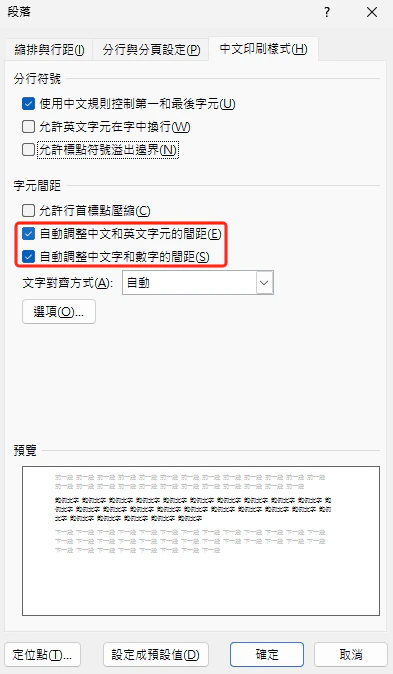
- Location: Select the body text style → right-click → “Modify Style” → “Format” (lower left) → “Paragraph” → “Asian Typography” tab
- Check: “Automatically adjust spacing between Chinese and Western text” and “Automatically adjust spacing between Chinese text and numbers”
-
Effect: Word automatically inserts fine-tuned spacing between Chinese and Latin/numeric characters, so manual spaces are not needed
4
Disable automatic image compression
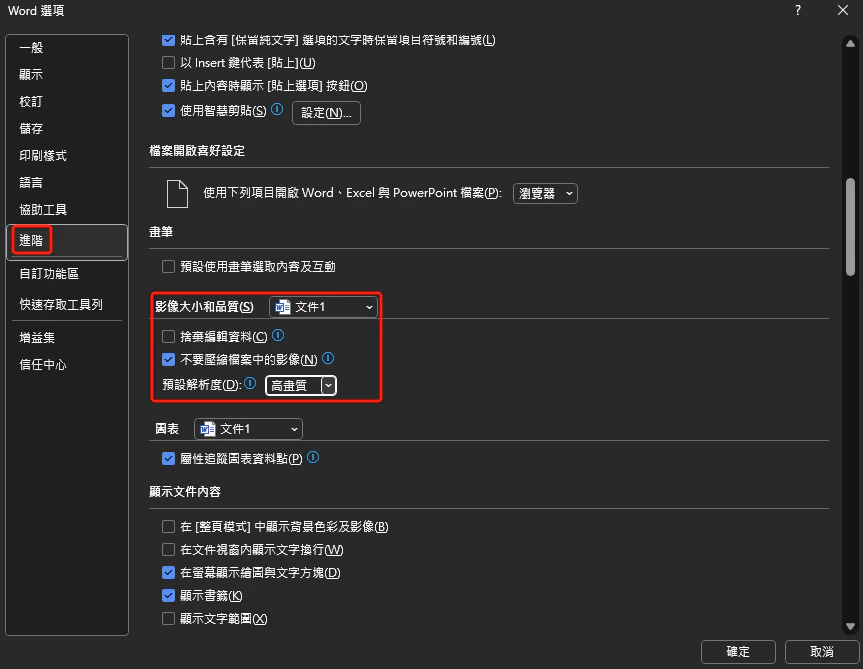
- Location: “File” → “Options” → “Advanced”
- Uncheck: “Do not compress images in file”
-
Purpose: Preserve the original image resolution
Color Conventions for Revision Marks
The following color conventions are for reference only; follow your organization’s style guide in practice.Figure and Table Layout and Cross-References
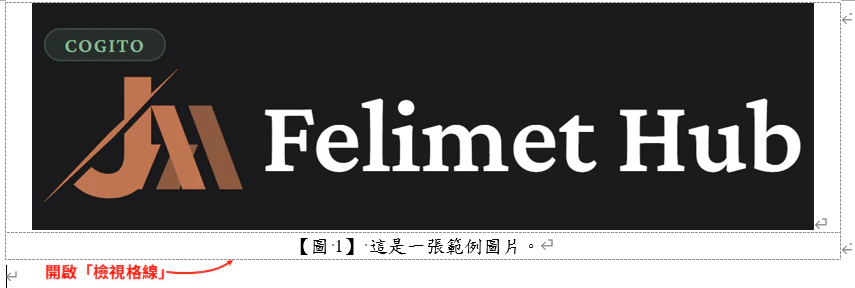
- After inserting a figure or table, use “Insert Caption” to auto-number it (follow your organization’s numbering format)
- When citing in the body text, use “Cross-Reference” rather than manually typing the number
- Benefit: when the order of figures or tables changes, numbering updates automatically
- As shown in [Figure 3], the model’s recognition accuracy remains stable across different test conditions.
- [Table 2] lists a comparison of computation times across algorithms.
Figures and Flowchart Standards
Image Format Requirements
Vector graphics
Recommended format: SVG
- Use cases: flowcharts, architecture diagrams, schematics
- Advantages: infinite scaling without quality loss, small file size
- Tools: Visio, draw.io, yEd
Raster graphics
Recommended format: high-resolution PNG
- Use cases: screenshots, experimental result photos
- Minimum resolution: 800 × 800 pixels
- Note: figures cited from references must be clearly legible
Visio Export Settings
Recommended export steps:1
Save As
Open the Visio file and choose “File” → “Save As”.
2
Choose PNG format
Set the file type to “Portable Network Graphics (*.png)”.
3
Configure export options
Click the “Options” button and configure:
- Resolution: 800 DPI or higher
- Background: transparent (if needed)
- Size: maintain original proportions
4
Verify the graphic
After exporting, verify the graphic is complete and no symbols are missing.
Flowchart Color Principles
Mathematical Equations and References
MathType Equation Editor
Tool installationMathType is the most professional mathematical equation editor for Word, supporting LaTeX syntax and a symbol panel.
Visit the MathType website to download and install.
- E = … (1)
- E = (1)
EndNote Reference Management
IEEE citation format examples:- Journal article
- Conference paper
- Book chapter
- Web resource
A. B. Smith and Y. K. Chen, “Deep learning for autonomous
driving: A survey,” IEEE Trans. Pattern Anal. Mach. Intell.,
vol. 43, no. 8, pp. 2345-2367, Aug. 2021,
doi: 10.1109/TPAMI.2021.1234567.
Automation Checking Tools
More tools available herePangu.js Toolchain
pangu.js automatically inserts spaces between Chinese and English text, with support for multiple programming languages and editors.pangu.js
JavaScript implementation, usable in both browsers and Node.js
pangu.py
Python version, suitable for batch-processing Markdown files
pangu.vim
Vim plugin, formats the current file in real time
intellij-pangu
JetBrains IDE plugin, supports PyCharm and IntelliJ IDEA
AutoCorrect Toolchain
AutoCorrect is more powerful than Pangu, with support for auto-correcting punctuation, proper noun capitalization, and more. Installation and usage:- Command-line tool
- VS Code
- CI/CD integration
Pre-Publication Checklist
Items to Check Before Publishing
1
Spacing
- Space between Chinese and English text
- Space between Chinese text and numerals
- Space between numerals and units (except degrees and percentages)
- No extra spaces before or after full-width punctuation
2
Punctuation
- Full-width punctuation in Chinese contexts
- Half-width punctuation in English contexts
- No repeated exclamation marks or question marks
- Correct quotation marks (Chinese「」, English "")
3
Proper nouns
- Correct capitalization for GitHub, Google, Microsoft, etc.
- Correct technical terms: PyTorch, TensorFlow, CUDA, etc.
- Taiwan academic terminology used (資料, 軟體, 演算法)
- No non-standard abbreviations (avoid h5, Ts, FED, etc.)
4
AI text markers
- Removed transition phrases such as “旨在探討”, “創新性地”, etc.
- Sentences read naturally with no machine-generated feel
- Arguments are specific; vague filler descriptions removed
5
Figures and tables
- Image resolution meets requirements (vector or 800+ DPI)
- Figure and table numbers use cross-references
- Flowchart color scheme is harmonious and professional
- All figures and tables are cited in the body text
6
References
- Managed with EndNote
- Consistent citation format (IEEE/APA, etc.)
- DOIs or URLs are complete and accessible
- No missing or incorrect citation numbers
Related Resources
Closing Remarks
The quality of a technical document directly affects professional image and the effectiveness of knowledge communication. Following this guide not only improves document readability but also establishes a unified writing standard for the team. Key takeaways:- Spacing signals professionalism: mixed Chinese-English text must include spaces
- Punctuation must be correct: full-width and half-width each have their place; never repeat
- Proper nouns must be precise: capitalization follows official definitions
- Eliminate AI lexical errors: remove filler transition phrases and ensure natural phrasing
- Leverage automation tools: Pangu.js and AutoCorrect improve efficiency
- Rigorous figure standards: prefer vector graphics; use cross-references for numbering
- Complete references: use EndNote and maintain a consistent citation format